
Coordinate asset intake, property preservation, valuations, vendor assignments, inspections, marketing, offers, expenses, documents, closing, and portfolio reporting through one configurable REO workflow.
Rhino REO provides Brokers and Real Estate Agents with tools to centralize their workflow, and provide their stakeholders greater visibility and control from initial assignment through completed disposition.
Managing bank-owned properties requires coordination across asset managers, brokers, preservation vendors, inspectors, valuation professionals, attorneys, title companies, buyers, and internal approval teams.
When property information, tasks, documents, expenses, offers, and communications are spread across separate systems, teams can lose visibility into deadlines, responsibilities, exceptions, and property status.
Rhino REO brings these activities into one organized environment.
Your team can receive assets, assign responsibilities, establish property-specific workflows, monitor preservation activity, collect valuations, manage listings and offers, track expenses, organize documents, coordinate closing, and maintain a record of activity throughout the property lifecycle.
The platform can be configured around your portfolios, users, business rules, client requirements, service-level expectations, and reporting processes.
Maintain oversight of bank-owned inventory, property conditions, valuations, preservation activity, listing status, offers, expenses, approvals, and completed dispositions.
Coordinate the operational steps required after foreclosure while maintaining clearer visibility into property status, timelines, assigned parties, documents, and exceptions.
Manage multiple clients, portfolios, property types, users, brokers, vendors, workflows, and reporting requirements through one configurable system.
Monitor acquired or managed assets through preservation, pricing, marketing, offer review, renovation, rental, or disposition workflows.
Connect property assignments with valuations, inspections, preservation, title activity, marketing, offers, approvals, expenses, and closing.
Receive assignments, manage property information, complete required tasks, submit valuations, maintain listings, upload documents, and coordinate buyer offers.
Receive work assignments, provide updates, upload photographs and documents, submit bids, and track required actions through structured workflows.
Access relevant property information, complete assigned tasks, upload required documents, and support the transaction through approved user permissions.
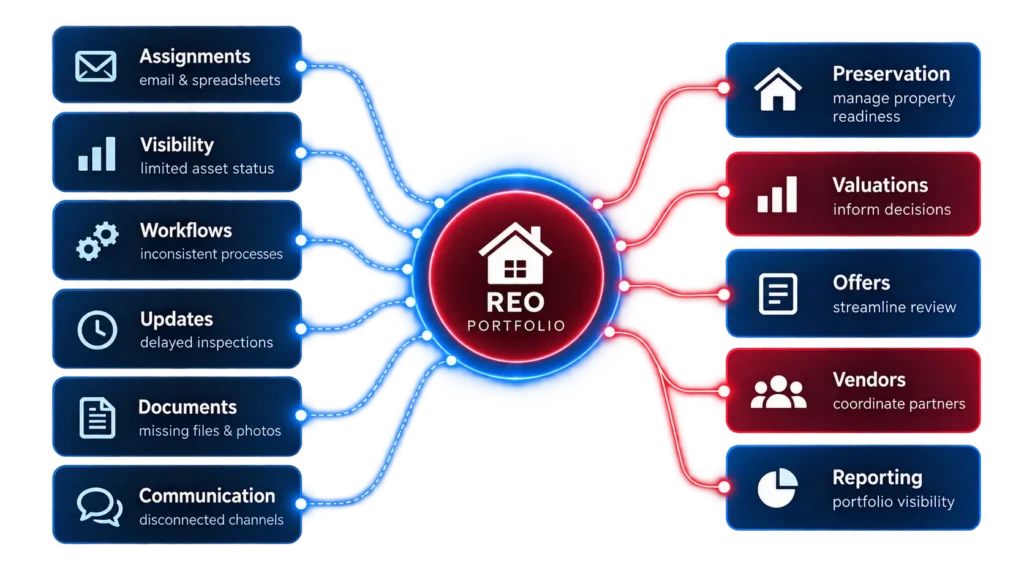
Organizations managing REO portfolios frequently face challenges such as:
Rhino REO provides a configurable environment for connecting these activities within one property-level and portfolio-level workflow.
Asset data is imported and automatically assigned to the appropriate management team.
Vendors are dispatched for inspections, repairs, and BPOs/Appraisals to establish strategy.
Property is listed, offers are managed through highest-and-best rounds, and contracts are negotiated.
Title issues resolved, closing documents finalized, and full asset lifecycle reporting generated.
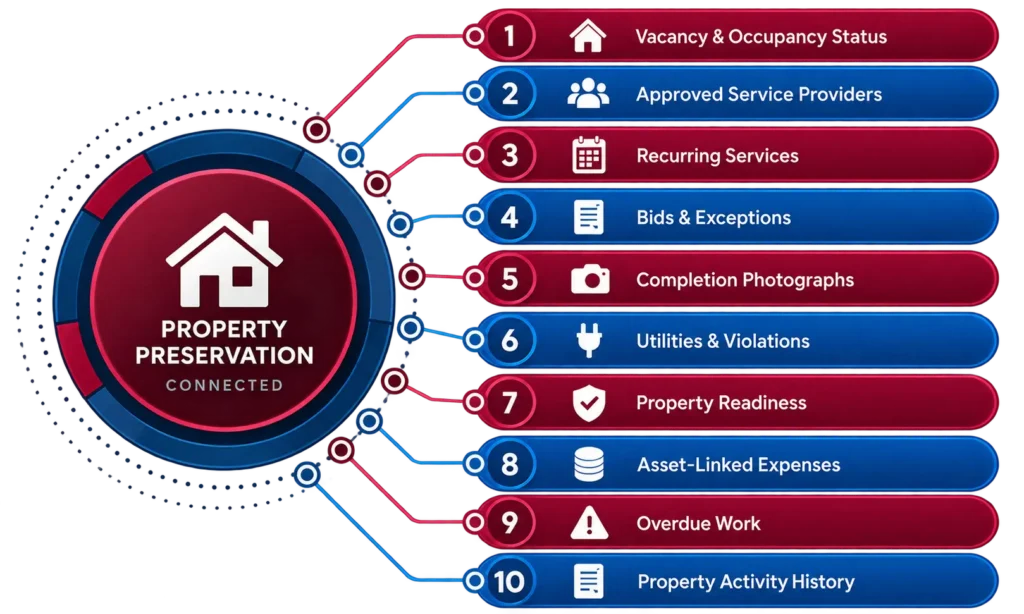
Preservation should not operate as a disconnected work-order process.
Rhino REO can connect preservation activity with the property record, assigned vendors, inspections, bids, approvals, photographs, expenses, documents, and portfolio status.
Valuations influence listing prices, renovation decisions, offer reviews, portfolio strategy, and disposition timing.
Rhino can connect property valuations with the wider REO record so authorized users can review the information supporting key decisions.
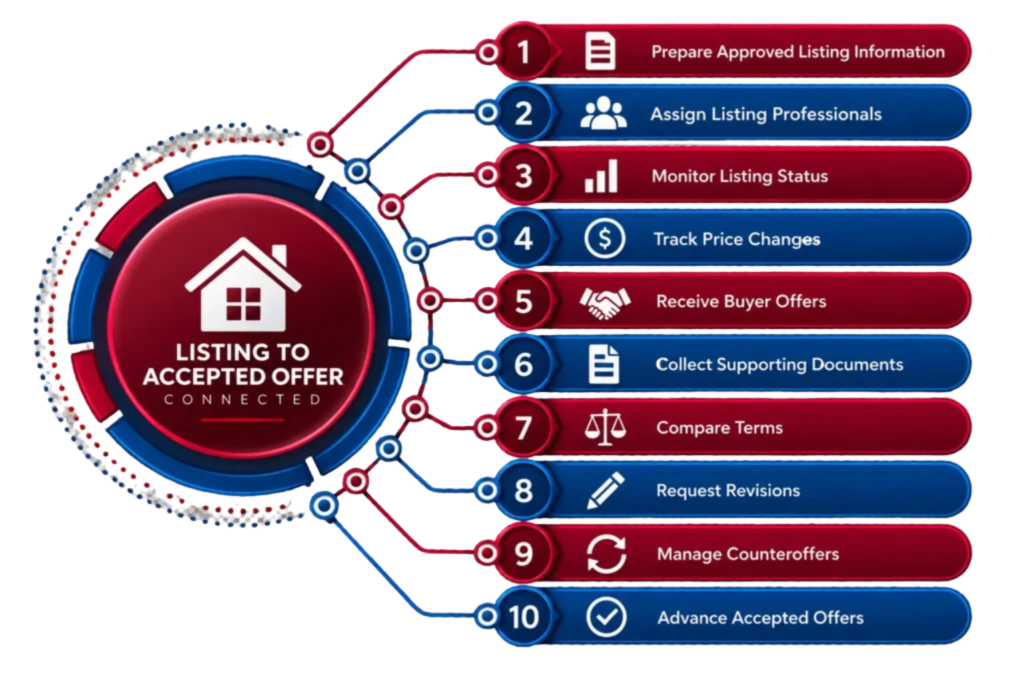
Rhino REO can connect asset-management activity with property marketing and structured offer management.
The workflow may help teams:
Where appropriate, property marketing and buyer activity can connect with the Rhino Homes marketplace.
Custom data points for unique tracking.
Granular permissions and access control.
Automated task generation based on triggers.
Defined routing for expenses and offers.
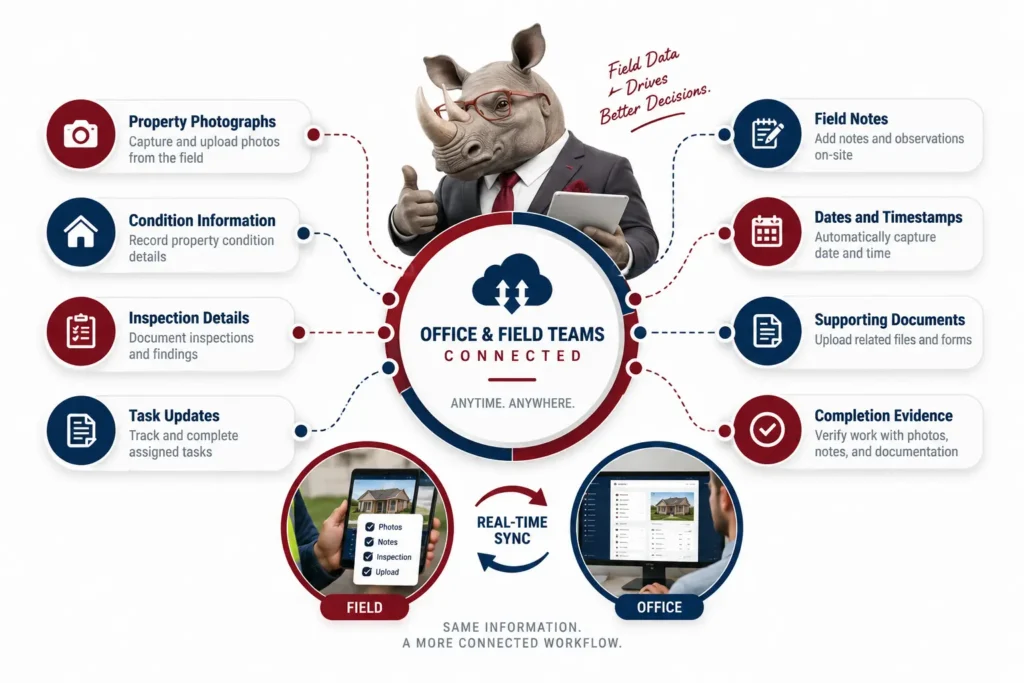
Property activity often happens away from the office.
Mobile workflows can help approved users capture and submit:
Rhino’s current REO page mentions mobile photo and data collection, while Rhino 360 is presented as its dedicated mobile property-photo and inspection product.
Coordinate valuation orders, broker panels, forms, reviews, revisions, and pricing information.
Publish approved property inventory, manage buyer offers, coordinate approvals, and support disposition through marketplace workflows.
Capture property photos, field information, inspection details, and supporting reports through mobile workflows.
Coordinate approved property-preservation vendors, brokers, and field-service providers across territories and assignments.
Review your portfolios, property types, users, brokers, vendors, current systems, task requirements, forms, reports, approvals, and operational challenges.
Set up property fields, task sequences, user responsibilities, statuses, due dates, notifications, approval paths, documents, and business rules.
Determine how new assets will enter Rhino and how property information will connect with approved servicing, valuation, accounting, marketplace, document, and reporting systems.
Validate asset intake, assignments, preservation, valuations, inspections, listings, offers, expenses, approvals, and reporting with selected users.
Prepare administrators, asset managers, brokers, vendors, and participating partners for their responsibilities.
Deploy the approved workflow and continue refining it as portfolio, client, or operational requirements evolve.
Tell Rhino about your portfolio, current process, property volume, brokers, vendors, reporting requirements, and operational challenges.
REO asset management software helps organizations manage bank-owned properties from asset intake through preservation, valuation, marketing, offers, expenses, closing, and reporting.
REO means “real estate owned.” It generally refers to a property owned by a lender, bank, investor, or another institution after an unsuccessful foreclosure sale or another ownership transfer.
REO software may be used by banks, mortgage servicers, asset management companies, institutional investors, REO providers, brokers, listing agents, property-preservation vendors, title companies, and closing teams.
Rhino may support workflows covering asset boarding, broker and vendor assignment, preservation, inspections, valuations, listing, offers, documents, expenses, approvals, closing, and reporting. The exact active functions should be confirmed during a product demonstration.
Rhino can be configured to coordinate preservation assignments, vendor activity, bids, inspections, photographs, documents, expenses, and completion review, subject to the approved product configuration.
The existing Rhino REO page refers to traditional sales, REO, short sales, and rentals. The exact workflows and current support status should be confirmed before publication.
Rhino can be configured around an organization’s approved broker and vendor model. Provider onboarding, qualification, assignment, and access requirements should be reviewed during discovery.
Rule-based workflows may route tasks based on factors such as property location, portfolio, service territory, asset type, user responsibility, availability, or client requirements. Available automation should be confirmed during implementation planning.
Rhino’s wider platform includes a valuation and BPO solution. Valuation activity can be connected with property records, providers, review requirements, pricing decisions, and reporting.
The current product description refers to mobile photo and data collection, and Rhino 360 provides related mobile inspection and photo-reporting capabilities. The exact relationship between the applications should be clarified.
Request a demonstration and provide information about your portfolio size, clients, property types, users, brokers, vendors, current systems, and reporting requirements.
Tell us about your portfolio, current systems, broker and vendor model, property workflows, and reporting requirements.